
DARAJA is currently in its pilot and early-access phase. While we prepare for official release on the Google Play Store and Apple App Store, the app is available for download directly from our website.
This guide will help you install the DARAJA app safely on your Android phone.
Step 1 – Download the DARAJA App
Go to the DARAJA website and tap the Download DARAJA App button.
Or click this link to initiate the download.
The APK file is the official installation file for the DARAJA Android app.
Step 2 – Allow App Installation
Because DARAJA is not yet on the Play Store, Android will ask for permission to install the app.
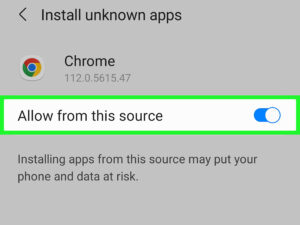
- After downloading, tap the DARAJA.apk file.
- A message will appear saying, “For your security, your phone is not allowed to install unknown apps from this source.”
- Tap Settings
- Turn on Allow from this source
- Go back and tap Install
This only needs to be done once.
Step 3 – Install the App
After you tap Install, the DARAJA app will be installed on your phone.
When the installation is finished:
- Tap Open to launch the app
- Or find DARAJA in your app list
Is This Safe?
Yes. The DARAJA app you download from our website is the official and verified version developed by the DARAJA Climate Services team and Centre for Community Initiatives (CCI).
Why Is DARAJA Not Yet on the Play Store?
DARAJA is currently being rolled out through pilot projects and partner communities as we improve features and ensure the system works well for farmers, fishers, and urban communities.
Once testing is complete, DARAJA will be released on:
- Google Play Store
- Apple App Store
Until then, downloading from our website gives you early access to new features and improvements.
Need Help?
If you have any trouble installing the app, please get in touch with us through the DARAJA website or our support channels. You can also email us at darajaservicesapp@gmail.com.
We are happy to assist you.